Ticket FAQ
Modified on: 2026-06-15 18:07
Q: I have signed a contract. How can I obtain API authorization?
A: Once the Contract is signed, the DerbySoft support team will activate your account and assign you an Account ID. You will get a token email with the client ID and client secret sent by the system. If you still not yet received this email, please fill this Form. any further support, you can contact ticket_info@derbysoft.com.
Q: I tried to generate the token on the Ticket API portal but got an error: “Unable to get access token.”
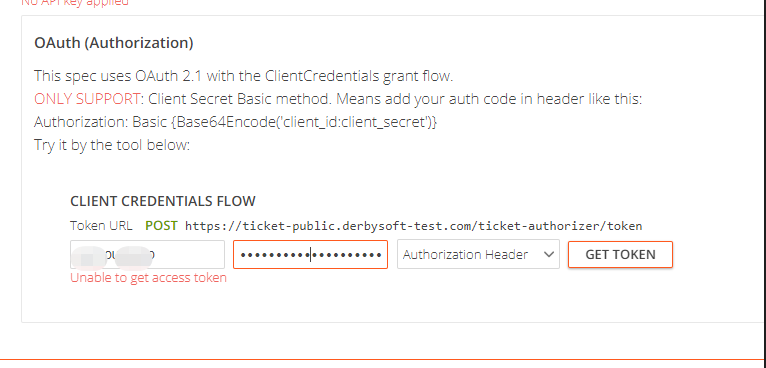
A:
- Make sure you get the latest and correct credentials from Derbysoft
- Check the client ID spelling. Technically, Client id will be the same with the existing GO distributor code if you are a GO customer.
Q: I couldn’t get an authentication Access token, as when I click the “GET TOKEN” button, it doesn’t return a token.
A:
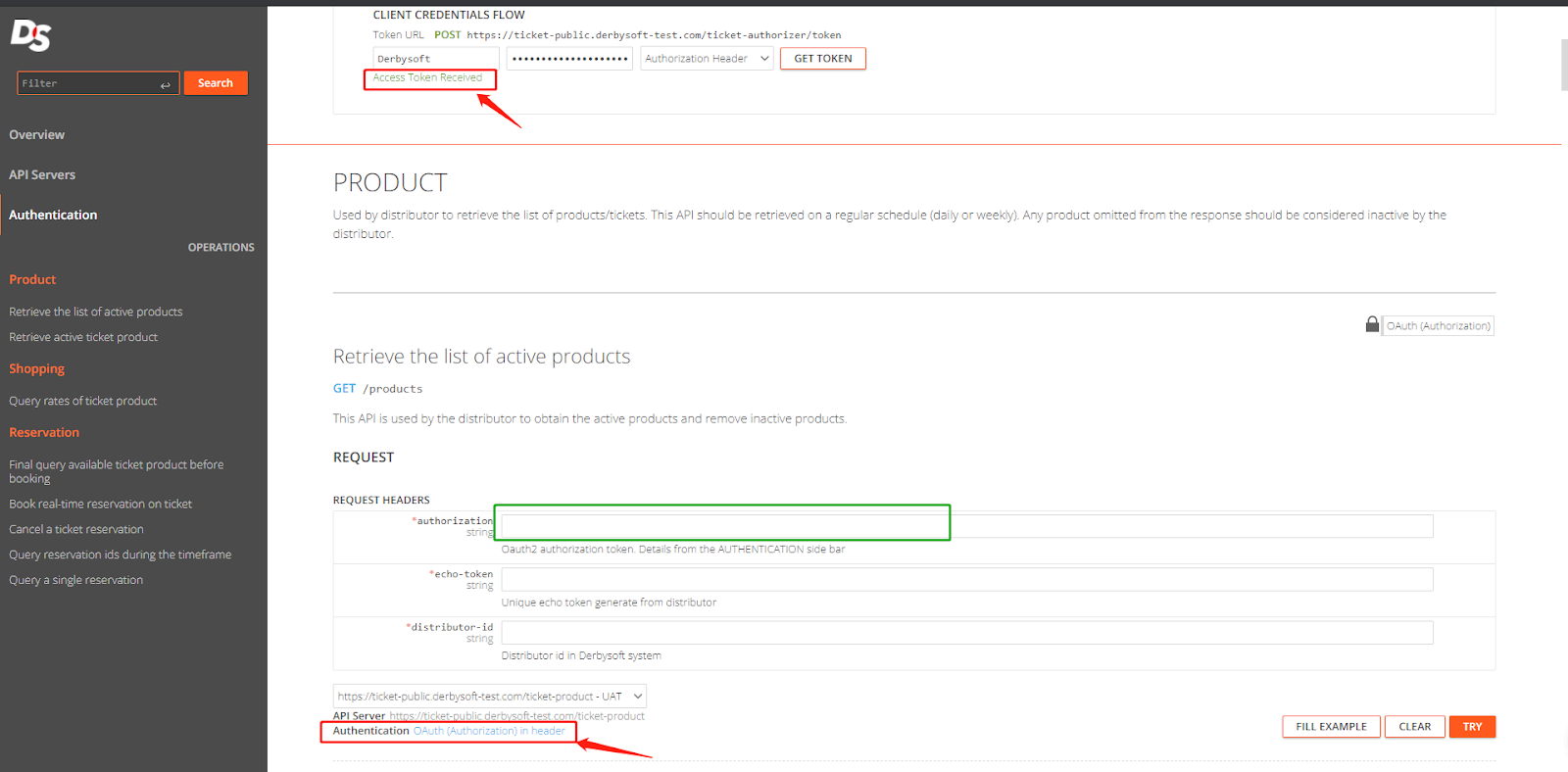
Step 1: Get Access token. After you fill in the correct client id and client secret, you click the GET TOKEN button, there will be a line "Access Token Received" appears at the bottom, which means you get the access token successfully. But it will not be displayed on the screen.
Step 2: You can start calling the following APIs with the generated token, take the pull product API, for example
You do not need to fill in the token in the authorization bar, and just leave it blank, which will be filled in automatically at the backend after step 1, and you can see the comments here changed from "(None Applied)" to "OAuth (Authorization) in header"
Q: What’s the unit of the “expires_in”
A: The "expires_in" value is returned in seconds; the value may not always be 28800. You should base your design on the expires_in value returned. Derbysoft will return the "access_token" and "expires_in" every call.
Q: How to generate the authorization in the header?
A: Authorization Header Generation Guide (According to the RFC 2617 Section 2 https://www.rfc-editor.org/rfc/rfc2617#section-2):
For example:
- client_id:TEST
- client_secret:59z2ikn000sO&9ytnBhs
Step 1: Combine client_id and client_secret with colon ‘:’, it will be TEST:59z2ikn000sO&9ytnBhs
Step 2:Use any tools to encode the string to Base64 format which will be:
VEVTVDo1OXoyaWtuMDAwc08mOXl0bkJocw==
Step 3: Then the authentication will be Basic VEVTVDo1OXoyaWtuMDAwc08mOXl0bkJocw==
(Note: There is a space “ “ between Basic and the encoded string
Q: How to generate the authorization in the header via Postman?
A: Here is the Guide:
- Step 1: Select File → Import → Raw Text in the Postman menu
- Step 2: Copy the Sample Request(CURL) example, paste it into the previous edit area, and Click Continue.
- Step 3: Replace your actual authentication value with the authentication header
Or you can use the Postman Authentication tab to generate an Authentication header automatically by reading the official guide https://learning.postman.com/docs/sending-requests/authorization/
Q: I got some errors when I tried to get the token and call APIs
A: You can see the details from the error_uri link in the error message; those are OAuth standard errors
error_uri="https://tools.ietf.org/html/rfc6750#section-3.1"
For example:
- Invalid_request error: The request is missing a required parameter, includes an unsupported parameter or parameter value, repeats the same parameter, uses more than one method for including an access token, or is otherwise malformed. The resource server SHOULD respond with the HTTP 400 (Bad Request) status code.
- Reason: The request is missing a required parameter, includes an unsupported parameter or parameter value
- Invalid_token error: The access token provided is expired, revoked, malformed, or invalid for other reasons. The resource SHOULD respond with the HTTP 401 (Unauthorized) status code. The client MAY request a new access token and retry the protected resource request.
- Reason: The access token expires every 8 hours and would need to be renewed
- Insufficient_scope error: The request requires higher privileges than provided by the access token. The resource server SHOULD respond with the HTTP 403 (Forbidden) status code and MAY include the "scope" attribute with the scope necessary to access the protected resource.
- Reason: Use the wrong client id and secret to generate the token. For example, use the "viewer" account to generate a token, but use the distributor‘s own distributorId to call the Ticket APIs. The "viewer" account will be only used for access to the document rather than the specific API services
- System error: You are not permitted to access this resource
- Reason: 1. Use the wrong distributorId, please check the distributorId spelling, which is same with client id ;2. Or reach out to Derbysoft to check the configuration.
Did you find it helpful? Yes No
Send feedback